📖 《把 AI 当助手——经济实证研究的诚信、方法与工具》双语网页版:每章中文部在前,English Edition 在后,内容与最新合订 PDF 一致。
第7章 · 调查数据收集:问卷设计与实施
本章导览
学习目标
完成本章后,你将能够:
问卷设计全流程——从操作化表出发,经题项撰写、组卷、预调研到正式定稿(承接第 5 章测量计划)
预调研与认知访谈——用小样本 (n = 30–50) 发现歧义与偏差,迭代修订问卷
调查偏差三类控制——识别并设计应对措施:抽样偏差 / 无回答偏差 / 回答偏差(社会期望偏误)
信效度检验实操——用 Stata 完成 Cronbach’s α + 探索性因子分析 + KMO 检验
本章路线图
第 5 章(操作化表)
        v
§7.1 问卷设计工作流 -> §7.2 题项撰写与排布 -> §7.3 访谈调查
        v
§7.4 调查偏差三类控制 -> §7.5 调查伦理(S7.1)
        v
§7.6 信效度检验实操(Stata)-> §7.7 数据入库
        v
产出物 + 自检
与第 5 章的分工:第 5 章给你的是测量的理论框架(概念化 → 操作化,产出 measurement_plan.md 操作化表);本章把这份理论计划落地为一份可执行、可发放、可回收数据的问卷,并处理实践中必然遇到的设计偏差、访谈技巧与伦理问题。若你跳过第 5 章直接来本章,至少先补读 §5.1–§5.3 的操作化链条与测量尺度,否则题项设计会失去依据。
§7.1 问卷设计工作流
五步流程
问卷设计不是一个“坐下来从头写到尾”的线性过程,而是一个迭代闭环。承接第 5 章你已经完成的测量计划(操作化表),现在进入“执行层”:
表 7.1 五步流程。
L4|L4|L4|L4
步骤 & 名称 & 核心任务 & 产出物
1 & 操作化表确认 & 每个构念→确定题项数量与类型(量表/分类/连续) &
2 & 题项库 & 为每个构念生成候选题项(含正向/反向),比正式用量多 50% &
3 & 组卷 & 排列顺序(先易后难 / 先一般后敏感)+ 人口统计放末尾 &
4 & 预调研 & 小样本 (n = 30–50) 测试 + 认知访谈 + 修订 &
5 & 定稿 & 正式发放,锁定版本号与日期 &\
问卷结构模板
一份标准学术问卷的骨架如下:
+-------------------------------------+
|  封面信(知情同意)                    |  <- 200 字以内
|  ·研究目的·匿名承诺·预计时长·联系方式   |
+-------------------------------------+
|  筛选题(如适用)                      |  <- "您是否在过去一年使用过…?"
+-------------------------------------+
|  主体题项(按构念分组)                 |  <- 每个构念 3–7 题
|  ·构念 A -> 构念 B -> 构念 C            |
+-------------------------------------+
|  人口统计学信息                        |  <- 性别/年龄/学历/收入(区间化)
+-------------------------------------+
|  致谢 + 结果反馈承诺                   |
+-------------------------------------+
电子问卷 vs 纸质问卷
表 7.2 电子问卷 vs 纸质问卷。
L3|L3|L3
维度 & 电子问卷(问卷星/腾讯问卷) & 纸质问卷
适用场景 & 远程大样本 / 城市群体 / 年轻群体 & 农村地区 / 入户调查 / 文化程度低
成本 & 几乎为零 & 印刷+差旅+人工录入
逻辑跳转 & 自动 & 人工指引
必答控制 & 可设置 & 靠访员监督
实时进度 & 后台监控 & 手动统计
偏差风险 & 抽样偏差(排斥无网络群体) & 录入错误
金融调查建议 & 银行客户/城镇居民 & 农户调查(建议电子+纸质双轨)\
实操提示:对农户调查,推荐“访员平板填写”模式——既保留电子问卷的逻辑控制,又避免农户自行操作的障碍。问卷星支持“访问员模式”。
§7.2 题项撰写与排布
语言规范六原则
表 7.3 语言规范六原则。
L3|L3|L3
原则 & 说明 & 正例
简短 & 单题 ≤ 20 字 & “您去年家庭总收入约为?”
清晰 & 不用模糊限定词 & “过去 12 个月”代替“最近”
一题一意 & 禁止双重问题 & 拆分为两题
避免术语 & 用被访者语言 & “贷款利息”代替“资金成本”
避免否定 & 尤其双重否定 & 正面陈述
避免诱导 & 中立措辞 & 不引用权威观点\
常见错误与改写示范
错误 1:双重问题(Double-barreled)
[x] "您对银行服务和手机 APP 满意吗?"
   -> 如果被访者对银行满意但对 APP 不满意,无法作答。

[v] 改写为两题:
   Q1 "您对银行网点服务整体满意吗?"  1=非常不满意 … 5=非常满意
   Q2 "您对手机银行 APP 整体满意吗?" 1=非常不满意 … 5=非常满意
错误 2:诱导性问题(Leading)
[x] "大多数学者认为数字金融有益于农民增收,您同意吗?"
   -> 引用权威形成压力,被访者倾向附和。

[v] 改写:
   "您认为数字金融对农民收入的影响是?"
   1=非常不利  2=不太有利  3=说不清  4=比较有利  5=非常有利
错误 3:多重否定(Double/Triple Negation)
[x] "您是否不认为农业保险没有必要?"
   -> 三重否定,认知负荷极高。

[v] 改写:
   "您认为农业保险对您的生产经营有帮助吗?"
   1=完全没有帮助 … 5=帮助非常大
错误 4:模糊限定(Vague Reference)
[x] "您经常使用移动支付吗?"
   -> "经常"因人而异(有人觉得一周一次就算经常)。

[v] 改写:
   "过去一个月,您使用移动支付(微信/支付宝等)的频率是?"
   1=从未  2=1–3 次  3=4–10 次  4=11–20 次  5=20 次以上
排布顺序原则
漏斗式:从宽泛到具体(先问“是否使用金融服务”,再问“使用哪种”)
先易后难:开头放事实性/行为性问题,降低心理门槛
先一般后敏感:收入、负债等敏感题放后半段
收入区间化:不要求精确数字,给区间选项(减少拒答与少报)
   您的家庭年收入约为:
[ ] 2 万以下 [ ] 2–5 万 [ ] 5–10 万 [ ] 10–20 万 [ ] 20 万以上人口统计放末尾:避免一开头就触碰隐私感
话题转换加过渡语:
"下面将询问您对农业保险的看法"
电子问卷的技术优势
逻辑跳转:根据前一题答案自动显示/隐藏后续题目
必答控制:未填写时不允许进入下一页
实时进度:后台查看回收量、完成率、平均答题时长
防重复提交:IP/微信 OpenID 限制
随机化:题项或选项随机排列,减少顺序效应
§7.3 访谈调查
访谈类型对比
表 7.4 访谈类型对比。
L5|L5|L5|L5|L5
类型 & 结构程度 & 适用场景 & 样本量 & 金融/农金举例
结构化访谈 & 高(固定问题+选项) & 大样本标准化比较 & 100+ & 农户信贷行为调查(与问卷等效)
半结构化访谈 & 中(提纲+追问自由) & 深入理解机制与过程 & 15–40 & 银行客户经理访谈 / 村干部座谈
无结构化访谈 & 低(开放式对话) & 探索性研究 & 5–15 & 民族志 / 参与式观察\
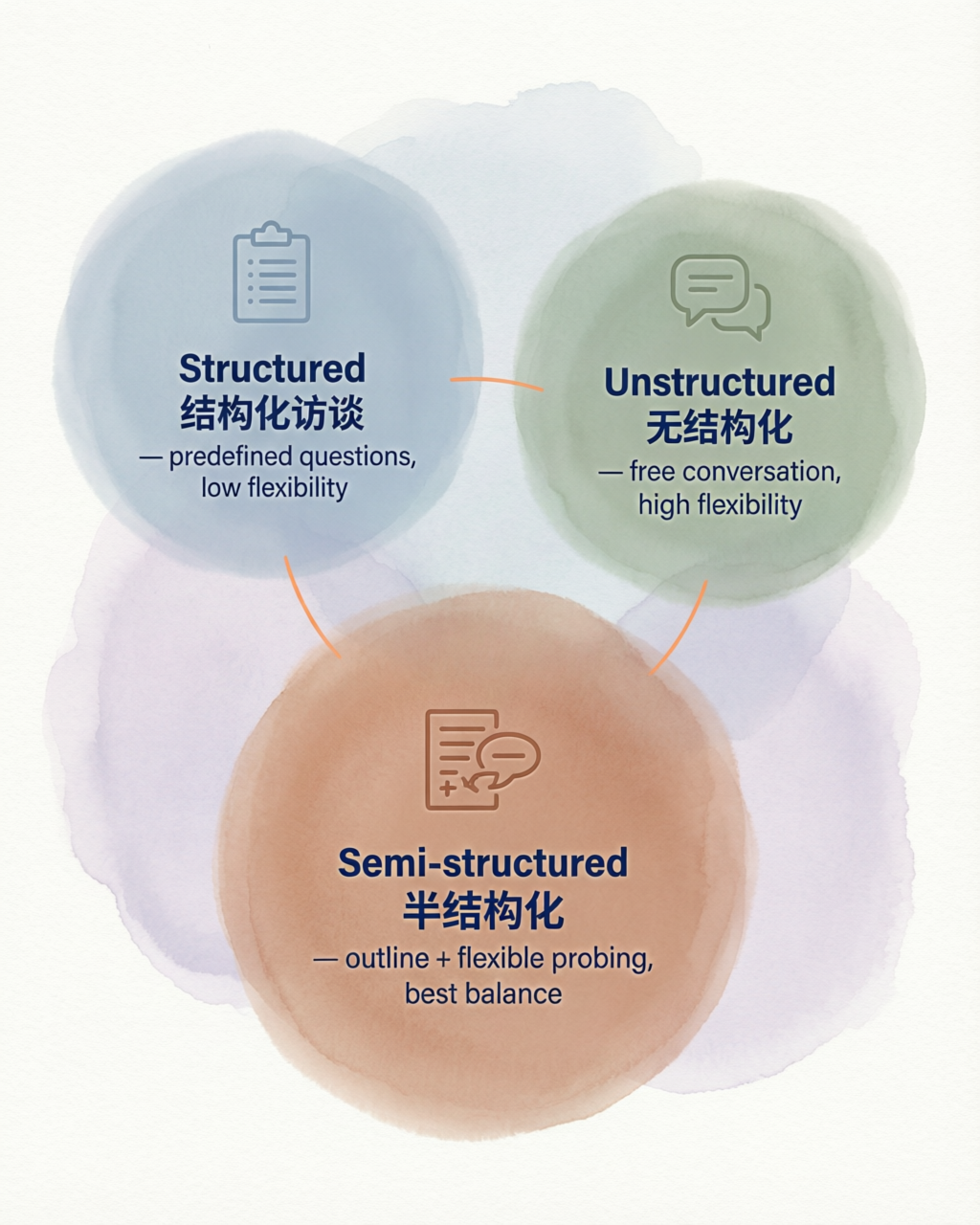
图 7.1 三类访谈三角对比——结构化(严谨可比)、无结构化(灵活深入)、半结构化(平衡两者)。
半结构化访谈 = 第 10 章案例研究的预演
在你的研究中,半结构化访谈最常见的用途是为案例研究收集深度数据。提纲通常包含:
半结构化访谈提纲模板
---------------------
一、暖场(2–3 min)
    ·自我介绍·研究简述·知情同意·录音许可

二、背景信息(5 min)
    ·您的岗位职责?·在这个岗位多久了?

三、核心问题(20–30 min)
    ·开放式问题 1:您如何看待…?
    ·开放式问题 2:能否举一个具体的例子…?
    ·追问:您刚才提到…,能否再详细说说?

四、补充(5 min)
    ·还有什么我没问到但您觉得重要的?
    ·您推荐我还可以和谁聊聊?

五、致谢(1 min)
    ·感谢·后续反馈承诺
---------------------
访谈提纲设计要点
开放式问题为主——“您如何看待…”而非“您是否同意…”
避免引导——不暗示“正确”答案
追问技巧:
沉默试探:暂停等待,暗示期待更多细节
公开鼓励:“嗯”“好的”——但绝不表态赞同/反对
寻求详述:“您能否再具体说说?”
重述:“我听您说…,是这个意思吗?”
控制时长:单次访谈 30–60 分钟为宜
录音+笔记:征得同意后录音,同时做关键笔记(设备故障时的备份)
焦点小组(Focus Group)
表 7.5 焦点小组(Focus Group)。
L2|L2
要素 & 说明
人数 & 6–10 人
时长 & 60–90 分钟
主持人角色 & 引导讨论、确保每人发言、控制强势个体
适用 & 探索性阶段(发现新构念/新维度)
金融举例 & 农户对新型保险产品的看法讨论
风险 & 从众效应——个别人可能不愿在同行面前表达真实看法\
§7.4 调查偏差三类控制
三类偏差总览
表 7.6 三类偏差总览。
L4|L4|L4|L4
偏差类型 & 含义 & 金融调查举例 & 控制措施
抽样偏差 & 样本系统性不代表总体 & 只在交通便利的村入户→遗漏偏远村农户 & 多阶段分层抽样 + 事后权重调整
无回答偏差 & 拒绝回答者与回答者特征系统性不同 & 高收入农户拒答率更高→收入均值被低估 & 追踪 / 替代 / 加权 / 提高回收率策略
回答偏差 & 回答不真实或不准确 & “您有多少存款?”→普遍少报 & 间接提问 / 区间化 / 匿名 / 行为题替代\
抽样偏差深入
承接第 5 章的抽样设计,这里强调执行层面的常见陷阱:
覆盖不足:抽样框(如村委会名单)遗漏了新迁入户
便利抽样伪装随机:只在集镇赶集日调查→系统性排除不赶集的农户
补救:使用多阶段分层随机抽样(PSU→村→户),事后用
svyset设定权重
无回答偏差深入
邮件调查回收率通常仅 15–20%。提高回收率的策略:
提前告知——先发通知信说明研究目的
内容相关性——让被访者感到调查与自己有关
简短友好——问卷不超过 15 分钟
权威背书——附村委会/银行的推荐信
多次追踪——对未回应者发 2–3 次提醒
激励——小额红包/话费/实物赠品
回答偏差:社会期望偏误
这是金融调查中最隐蔽也最严重的偏差之一:
直接提问:"您家有多少存款?"
-> 社会期望:少报(怕露富)或多报(面子)

改进策略:
(1) 区间化:"您家存款大约在哪个区间?"
(2) 行为替代:"过去一年您是否向银行存过钱?大约几次?"
(3) 第三方视角:"您觉得村里和您情况差不多的家庭,一般存款多少?"
(4) 匿名强调:封面信明确"本调查完全匿名,数据仅用于学术研究"
共同方法偏误(补充)
当自变量与因变量在同一份问卷、同一时间点测量时,相关系数会虚高。
应对:
时间分离:自变量和因变量分两次收集
方法分离:问卷测态度 + 档案数据测行为
统计检验:Harman 单因子检验(
factor后看第一因子解释方差比例)
§7.5 调查伦理
对应诚信检查点 S7.1(涉人研究的伦理底线)。
为什么伦理如此重要?
调查涉及真人——他们的时间、隐私、情感。学术伦理不仅是规范,更是法律要求(《个人信息保护法》2021 年施行)。一旦违反,后果可能包括:论文撤稿、学位撤销、法律责任。
知情同意书要素
一份合格的知情同意书必须包含:
表 7.7 知情同意书要素。
L3|L3|L3
要素 & 内容 & 示例措辞
研究目的 & 简明说明做什么 & “本研究旨在了解农户数字金融服务使用情况”
研究者身份 & 姓名、单位、导师 & “XX 大学经济学院研究生 XXX(导师:XXX 教授)”
自愿参与 & 可随时退出 & “您的参与完全自愿,可在任何时刻中止”
风险说明 & 可能的不适 & “不涉及任何身体或经济风险”
收益说明 & 对参与者的回报 & “您将获得 XX 元话费/礼品作为感谢”
保密承诺 & 数据如何使用 & “所有数据仅用于学术研究,以匿名方式报告”
联系方式 & 有问题找谁 & “如有疑问请联系:xxx@xxx.edu.cn”
签名/确认 & 同意参与 & “我已阅读并同意参与本研究 签名____”\
知情同意书模板(简化版,适用于农户调查)
-----------------------------------------------
              知情同意书

尊敬的朋友:

    您好!我是四川农业大学经济学院的研究生,正在进行
一项关于农村金融服务的学术研究。本调查大约需要 15 分
钟,所有回答仅用于学术研究,完全匿名,不会泄露您的个
人信息。您的参与完全自愿,可以在任何时候停止。

    如有任何问题,请联系:XXX(电话/微信:XXXXX)

    感谢您的参与和支持!

[ ] 我已阅读以上内容,同意参与本调查。
              签名(或按手印):________
              日期:____年____月____日
-----------------------------------------------
数据脱敏与匿名化
表 7.8 数据脱敏与匿名化。
L2|L2
阶段 & 操作
收集时 & 不记录姓名/身份证号;使用编号(如 Village01_Household023)
存储时 & 原始数据加密存储;纸质问卷锁柜保管
分析时 & 使用脱敏数据集(不含任何可识别信息)
发表时 & 不报告可定位的小样本统计(如“某村仅 3 户,其中 2 户…”)
访谈时 & 录音转写后替换真名为代号(“受访者 A”/“某银行支行行长”)\
伦理审查
何时需要:涉及人类被试的研究原则上都应通过伦理审查
国内现状:部分高校已设立 IRB(伦理审查委员会),部分尚未强制
最低标准:即使学校无正式 IRB,也应做到——知情同意 + 匿名 + 无害 + 导师签字确认
发表论文:国际期刊通常要求在稿件中注明“本研究已通过 XX 大学伦理审查(批号:XXXX)”
§7.6 信效度检验实操
前置准备:数据格式
信效度检验要求数据为宽格式(每行一个被访者,每列一个题项)。假设你的量表有:
构念“数字金融使用”(DF):
df1–df5(5 个题项,Likert 1–5)构念“信贷可得性”(CA):
ca1–ca4(4 个题项,Likert 1–5)
第一步:Cronbach’s α(信度)
* -- 信度检验:Cronbach's α --
* 对"数字金融使用"量表的 5 个题项做 α 检验
alpha df1 df2 df3 df4 df5

* 输出解读:
*   Cronbach's alpha = 0.XXXX
*   判断标准:α ≥ 0.7 可接受;α ≥ 0.8 良好;α ≥ 0.9 优秀
*   若 α < 0.7:查看 "alpha if deleted" 列,删除该题后 α 是否显著提升

* 对"信贷可得性"量表同理
alpha ca1 ca2 ca3 ca4判断规则:
表 7.9 第一步:Cronbach’s α(信度)。
L3|L3|L3
α 值 & 判断 & 行动
≥ 0.9 & 优秀(但可能冗余) & 检查是否有题目高度重复
0.8–0.9 & 良好 & 可接受
0.7–0.8 & 可接受 & 可接受,但建议优化
< 0.7 & 不可接受 & 删题/改题后重新检验\
第二步:KMO 检验 + Bartlett 球形检验(因子分析前提)
* -- KMO 检验(取样适切性量数)--
* 需要安装:ssc install relife(或 ssc install kmo)
estat kmo          // 如果刚跑完 factor,可直接用
* 或独立命令:
kmo df1 df2 df3 df4 df5 ca1 ca2 ca3 ca4

* 输出解读:
*   KMO 值判断:≥ 0.9 极好;0.8–0.9 良好;0.7–0.8 中等;
*               0.6–0.7 勉强;< 0.6 不适合做因子分析

* -- Bartlett 球形检验 --
* H0:相关矩阵为单位矩阵(变量间无相关)
* 期望 p < 0.05 拒绝 H0 -> 适合做因子分析
factor df1 df2 df3 df4 df5 ca1 ca2 ca3 ca4, pcf
estat bartlett      // Stata 16+ 支持
第三步:探索性因子分析(EFA)
* -- 探索性因子分析(主成分法 + 方差最大旋转)--
factor df1 df2 df3 df4 df5 ca1 ca2 ca3 ca4, pc varimax
* pc = 主成分提取;varimax = 方差最大正交旋转

* 输出解读:
*   (1) 看旋转后因子载荷矩阵:
*       - 每个题项应在其对应构念上载荷 ≥ 0.5
*       - 交叉载荷(在两个因子上都 > 0.4)-> 考虑删除该题
*   (2) 看特征值 > 1 的因子数量(Kaiser 准则)
*   (3) 看累积解释方差:建议 ≥ 60%

* 如果特征值准则提取的因子数 ≠ 预期构念数,可手动指定:
factor df1 df2 df3 df4 df5 ca1 ca2 ca3 ca4, pc varimax f(2)
* f(2) = 强制提取 2 个因子
第四步:聚合信度与判别效度(进阶)
* -- AVE(平均方差萃取)与 CR(组合信度)--
* 需要从因子载荷矩阵手工计算,或使用社区命令:
* ssc install avevar(如有)

* AVE = Σ(标准化载荷²) / 题项数
* CR  = (Σ标准化载荷)² / [(Σ标准化载荷)² + Σ(1-载荷²)]
* 判断标准:AVE ≥ 0.5;CR ≥ 0.7

* 判别效度(Fornell-Larcker 准则):
*   每个构念的 √AVE 应大于该构念与其他构念的相关系数
完整示例代码(可直接运行)
* ===================================================
* 信效度检验完整流程
* 数据:survey_data.dta(含 df1-df5, ca1-ca4)
* ===================================================
clear all
set more off

* 2. Cronbach's α 信度检验
alpha df1 df2 df3 df4 df5      // 数字金融量表
alpha ca1 ca2 ca3 ca4          // 金融能力量表
* 判断:α ≥ 0.7 可接受;α ≥ 0.8 良好

* 3. 探索性因子分析(EFA)
* 先做 KMO 和 Bartlett 球形检验
estat kmo
factortest df1-df5
* 提取因子(主成分法 + 方差最大旋转)
factor df1-df5, pcf
screeplot                    // 碎石图辅助判断因子数
rotate, varimax              // 方差最大旋转
loadingplot                  // 载荷图

* 4. 验证性因子分析(CFA,需 sem 模块)
* ssc install sem
sem (df1-df5 -> df) (ca1-ca4 -> ca), stand
estat fit                    // 模型拟合指标:CFI>0.9, RMSEA<0.08
* 收敛效度:因子载荷 > 0.5,AVE > 0.5
* 组合信度 CR > 0.7

* 5. 判别效度(Fornell-Larcker 准则)
*   每个构念的 √AVE 应大于该构念与其他构念的相关系数
save "survey_factor_scores.dta", replace
di "信效度检验完成!"
AI 辅助提示:你可以将 α 检验输出贴给 AI,让它帮你判断哪些题项应删除,并解释原因。但最终决策必须由你做出——AI 不了解你的理论框架。
§7.7 数据入库
电子问卷导出(以问卷星为例)
问卷星后台操作路径:
  我的问卷 -> 选择问卷 -> 统计&下载 -> 下载原始数据
  可选格式:Excel (.xlsx) / CSV / SPSS (.sav)

推荐:下载 Excel 格式(保留变量名和选项文本)导出后的典型列名:
表 7.10 电子问卷导出(以问卷星为例)。
L2|L2
原始列名(问卷星自动生成) & 你需要做的
“序号” & 保留为 ID
“提交答卷时间” & 提取日期/时间
“所用时间(秒)” & 用于筛除过快答卷
“1.您的性别” & 重命名为 gender
“2.您的年龄” & 重命名为 age
“3_1.您对银行服务满意” & 重命名为 satis1\
Stata 读入与重命名
* -- 数据入库流程 --
clear all
set more off

* 1. 导入 Excel
import excel "raw_survey_data.xlsx", sheet("Sheet1") firstrow

* 2. 查看当前变量名(通常很长且含中文)
describe

* 3. 重命名为简洁英文变量名
rename 性别 gender
rename 年龄 age
rename 您的家庭年收入 income
rename 您对银行服务满意 satis1
rename 您对银行服务效率满意 satis2

* 4. 添加变量标签
label var age     "年龄(岁)"
label var satis1  "银行服务满意度(1-5)"
编码簿(Codebook)建立
编码簿是你的“数据说明书”,记录每个变量的含义、取值范围和来源题项。
编码簿模板(建议用 Excel 维护):
表 7.11 编码簿(Codebook)建立。
L6|L6|L6|L6|L6|L6
变量名 & 变量标签 & 题项编号 & 取值说明 & 类型 & 备注
id & 受访者编号 & — & 1–N & int & 系统自动生成
gender & 性别 & Q1 & 1=男, 2=女 & byte & —
age & 年龄 & Q2 & 18–80 & int & —
income & 家庭年收入 & Q3 & 1=<2万, 2=2-5万, 3=5-10万, 4=10-20万, 5=>20万 & byte & 区间化
df1 & 数字金融使用1 & Q10_1 & 1=完全不同意 … 5=完全同意 & byte & Likert-5\
数据清洗初步:删除无效问卷
在正式分析前,需剔除无效问卷。常用标准:
* -- 无效问卷筛除 --

* 标准 1:答题时间过短(< 总题数 × 3 秒)
* 假设问卷有 30 题,阈值 = 90 秒
gen valid_time = (duration >= 90)
tab valid_time
* 记录删除数量

* 标准 2:直线作答(Straight-lining)——连续 N 题选同一选项
* 以量表题(satis1-satis5)为例
egen satis_sd = rowvard(satis1 satis2 satis3 satis4 satis5)
gen straight = (satis_sd == 0)    // 标准差为 0 = 全部选同一选项
tab straight
* 记录删除数量

* 标准 3:缺失值过多(缺失 > 总题数的 10%)
egen miss_count = rowmiss(gender age satis1-satis5)
gen valid_miss = (miss_count <= 3)
tab valid_miss

* 标准 4:重复提交(同一 IP 或同一设备 ID)
duplicates report respondent_id
duplicates drop respondent_id, force

* 综合筛选
gen valid = (valid_time == 1) & (straight == 0) & ///
            (valid_miss == 1)
tab valid
keep if valid == 1

* 保存清洗后数据
save "survey_clean.dta", replace
di "有效样本量:" _N
S7.2 诚信要求:问卷原始数据一经录入,不得事后修改。清洗操作必须有 do 文件记录(留痕),确保可复现。如果后续发现录入错误,应标注更正日志,而非直接覆盖。
AI 辅助研究栏 · 第 7 章
AI 在问卷调查中的合法应用
表 7.12 AI 在问卷调查中的合法应用。
L3|L3|L3
应用场景 & 具体做法 & 注意事项
问卷评审 & 将题项贴给 AI,问“这些问题是否存在双重提问、诱导性、模糊限定?” & AI 的建议仅供参考,最终措辞你来决定
编码簿生成 & 贴入变量列表,让 AI 生成 codebook 模板 & 生成后必须逐条核对
认知访谈辅助 & 预调研后,将受访者反馈贴给 AI,让它归纳常见问题 & 不要将受访者个人信息贴入
信效度解读 & 将 α 输出贴给 AI,让它帮你判断是否达标 & 删题决策必须基于理论,不能纯看数字
翻译 & 中英文问卷互译(跨文化研究) & 翻译后需回译验证(back-translation)\
AI 不能做的事
❌ 替你设计问卷的理论框架(那是第 2–5 章的工作)
❌ 伪造调查数据或编造不存在的受访者回答
❌ 替代伦理审查
❌ 在未经你确认的情况下自动修改题项
AI 诚信栏 · 第 7 章
S7.1 调查伦理(知情同意 + 数据脱敏)
+-----------------------------------------------------+
|  * 诚信检查点 S7.1                                    |
|                                                       |
|  自查问题:                                            |
|  [ ] 是否获得受访者的知情同意(书面或口头记录)?          |
|  [ ] 数据是否已脱敏(不含姓名/身份证/精确地址)?         |
|  [ ] 涉人研究是否通过学校伦理审查(或导师书面确认)?      |
|  [ ] 访谈录音是否在转写后替换了真名?                     |
|                                                       |
|  违规后果:论文撤稿 / 学位撤销 / 法律责任               |
+-----------------------------------------------------+
S7.2 问卷数据不得事后修改
+-----------------------------------------------------+
|  * 诚信检查点 S7.2                                    |
|                                                       |
|  核心原则:                                            |
|  · 原始数据只读——录入后不覆盖、不篡改                  |
|  · 清洗必须有 do 文件留痕——每一步操作可复现            |
|  · 更正日志——若发现录入错误,另建更正文件,标注:       |
|    "ID=xxx,变量=age,原值=25,更正为=35,             |
|     原因:与纸质问卷核对不一致,日期:2026-10-15"       |
|  · 绝不"美化"数据——不能因为某受访者回答"不合理"        |
|    就擅自修改为"合理"值                                |
|                                                       |
|  留痕标准:                                            |
|  · survey_raw.dta    -> 原始数据(只读,永不覆盖)      |
|  · survey_clean.dta  -> 清洗后数据                     |
|  · clean_log.do      -> 清洗操作脚本                   |
+-----------------------------------------------------+
本章产出物
完成第 7 章学习后,你应产出以下文件:
表 7.13 本章产出物。
L4|L4|L4|L4
序号 & 产出物 & 文件名建议 & 说明
1 & 预调研迭代版问卷 & & 经预调研修订后的定稿
2 & 信效度检验输出 & & Stata α + EFA 完整日志
3 & 编码簿 & & 变量名/标签/取值/来源
4 & 知情同意书 & & 适用于你的调查对象
5 & 数据清洗脚本 & clean_log.do & 从原始到分析数据的全过程\
下一章预告:第 8 章将从“数据已入库”出发,完成描述统计与数据体检——你的数据分析正式从这里开始。
English Edition
Chapter 7 · Survey Data Collection: Questionnaire Design and Implementation
Chapter Overview
Learning Objectives
After completing this chapter, you will be able to:
The full questionnaire design workflow—from the operationalization table through item writing, questionnaire assembly, and pretesting to the final version (building on the measurement plan of Ch. 5)
Pretesting and cognitive interviews—use a small sample (n = 30–50) to uncover ambiguity and bias, and revise iteratively
Controlling the three types of survey bias—identify and design countermeasures for sampling bias / non-response bias / response bias (social desirability)
Reliability and validity testing in practice—run Cronbach’s alpha + exploratory factor analysis + the KMO test in Stata
Chapter Roadmap
Operationalization table (Ch. 5)
        v
7.1 Questionnaire design workflow -> 7.2 Item writing and layout -> 7.3 Interview surveys
        v
7.4 Controlling three types of bias -> 7.5 Research ethics (S7.1)
        v
7.6 Reliability & validity tests (Stata) -> 7.7 Data entry
        v
Deliverables + self-check
Division of labor with Ch. 5: Chapter 5 gave you the theoretical framework of measurement (conceptualization → operationalization, producing the measurement_plan.md operationalization table); this chapter turns that theoretical plan into an executable, distributable questionnaire that can collect data, and handles the bias control, interview skills, and ethics issues that practice inevitably raises. If you skipped Ch. 5 and came straight here, at least read §5.1–§5.3 on the operationalization chain and measurement scales first—otherwise your item design will have no grounding.
7.1 The Questionnaire Design Workflow
The Five-Step Workflow
Questionnaire design is not a linear “sit down and write from start to finish” process, but an iterative loop. Building on the measurement plan (operationalization table) you completed in Ch. 5, you now enter the “execution layer”:
Table 7.1 The five-step workflow.
L4|L4|L4|L4
Step & Name & Core task & Deliverable
1 & Confirm the operationalization table & For each construct → decide the number and type of items (scale / categorical / continuous) &
2 & Build the item pool & Generate candidate items per construct (positive/reverse), 50% more than needed &
3 & Assemble the questionnaire & Arrange order (easy first / general before sensitive) + demographics at the end &
4 & Pretest & Small-sample test (n = 30–50) + cognitive interviews + revision &
5 & Finalize & Official distribution; lock the version number and date &\
Questionnaire Structure Template
The skeleton of a standard academic questionnaire:
+-------------------------------------+
|  Cover letter (informed consent)    |  <- within 200 words
|  - Purpose - Anonymity - Duration - Contact |
+-------------------------------------+
|  Screening items (if applicable)    |  <- "Have you used ... in the past year?"
+-------------------------------------+
|  Main items (grouped by construct)  |  <- 3-7 items per construct
|  - Construct A -> Construct B -> Construct C |
+-------------------------------------+
|  Demographics                       |  <- gender/age/education/income (banded)
+-------------------------------------+
|  Thanks + promise of result feedback |
+-------------------------------------+
Online vs. Paper Questionnaires
Table 7.2 Online vs. paper questionnaires.
L3|L3|L3
Dimension & Online (Wenjuanxing / Tencent Questionnaire) & Paper
Best for & Remote large samples / urban respondents / younger groups & Rural areas / door-to-door surveys / lower literacy
Cost & Nearly zero & Printing + travel + manual data entry
Skip logic & Automatic & Manual guidance
Required-answer control & Configurable & Relies on interviewer supervision
Real-time progress & Monitored in the backend & Counted manually
Bias risk & Sampling bias (excludes those without internet) & Data-entry errors
Finance-survey advice & Bank customers / urban residents & Farmer surveys (dual-track online + paper recommended)\
Practical tip: for farmer surveys, use the “interviewer-fills-tablet” mode—it keeps the logical controls of an online questionnaire while avoiding the barriers of farmer self-administration. Wenjuanxing supports an “interviewer mode”.
7.2 Item Writing and Layout
Six Principles of Item Wording
Table 7.3 Six principles of item wording.
L3|L3|L3
Principle & Explanation & Good example
Be brief & One item
Be clear & No vague qualifiers & “in the past 12 months” instead of “recently”
One idea per item & No double-barreled questions & Split into two items
Avoid jargon & Use the respondents’ language & “loan interest” instead of “cost of funds”
Avoid negation & Especially double negatives & Positive statements
Avoid leading & Neutral wording & Do not cite authorities\
Common Errors and Rewrites
Error 1: Double-barreled questions
[x] "Are you satisfied with the bank's service and its mobile app?"
   -> If the respondent likes the branch service but not the app,
      they cannot answer.

[v] Split into two items:
   Q1 "Overall, how satisfied are you with branch service?"
      1=very dissatisfied ... 5=very satisfied
   Q2 "Overall, how satisfied are you with the mobile banking app?"
      1=very dissatisfied ... 5=very satisfied
Error 2: Leading questions
[x] "Most scholars believe digital finance helps raise farmers'
    income. Do you agree?"
   -> Citing authority creates pressure; respondents tend to
      go along.

[v] Rewrite:
   "What effect do you think digital finance has on farmers'
    income?"
   1=very unfavorable  2=somewhat unfavorable  3=hard to say
   4=somewhat favorable  5=very favorable
Error 3: Multiple negation
[x] "Do you not think that agricultural insurance is unnecessary?"
   -> A triple negative; extremely high cognitive load.

[v] Rewrite:
   "Does agricultural insurance help your farming operations?"
   1=no help at all ... 5=a great deal of help
Error 4: Vague qualifiers
[x] "Do you often use mobile payment?"
   -> "Often" varies by person (some count once a week as often).

[v] Rewrite:
   "In the past month, how often did you use mobile payment
    (WeChat Pay / Alipay, etc.)?"
   1=never  2=1-3 times  3=4-10 times  4=11-20 times
   5=more than 20 times
Principles of Item Ordering
Funnel order: from broad to specific (ask “do you use financial services” before “which ones”)
Easy items first: open with factual / behavioral questions to lower the psychological barrier
General before sensitive: income, debt, and other sensitive items go in the later half
Band the income question: don’t demand exact figures; give bracket options (reduces refusal and under-reporting)
   Your household's annual income is about:
   [ ] under 20k RMB  [ ] 20k-50k  [ ] 50k-100k
   [ ] 100k-200k      [ ] over 200k
Demographics last: avoid touching privacy at the very start
Transitions between topics:
"Next we will ask about your views on agricultural insurance"
Technical Advantages of Online Questionnaires
Skip logic: later items are shown/hidden automatically based on earlier answers
Required-answer control: respondents cannot proceed without answering
Real-time progress: monitor response count, completion rate, and average duration in the backend
Duplicate prevention: restrict by IP / WeChat OpenID
Randomization: randomize item or option order to reduce order effects
7.3 Interview Surveys
Comparing Interview Types
Table 7.4 Comparing interview types.
L5|L5|L5|L5|L5
Type & Structure & Best for & Sample size & Finance / ag-finance example
Structured & High (fixed questions + options) & Standardized comparison on large samples & 100+ & Survey of farmers’ credit behavior (equivalent to a questionnaire)
Semi-structured & Medium (guide + free probing) & Understanding mechanisms and processes in depth & 15–40 & Bank relationship-manager interviews / village-cadre discussions
Unstructured & Low (open conversation) & Exploratory research & 5–15 & Ethnography / participant observation\
Figure 7.1 A triangular comparison of the three interview types—structured (rigorous and comparable), unstructured (flexible and deep), semi-structured (balancing both).
Semi-Structured Interviews: A Rehearsal for the Case Studies of Ch. 10
In your research, the most common use of the semi-structured interview is collecting in-depth data for case studies. A typical guide includes:
Semi-structured interview guide template
-----------------------------------------
I. Warm-up (2-3 min)
    - Self-introduction - Study briefing
    - Informed consent - Recording permission

II. Background (5 min)
    - What are your responsibilities?
    - How long have you been in this role?

III. Core questions (20-30 min)
    - Open question 1: How do you view ...?
    - Open question 2: Could you give a concrete example ...?
    - Probe: You mentioned ... earlier; could you elaborate?

IV. Additional questions (5 min)
    - What haven't I asked that you think is important?
    - Whom else would you suggest I talk to?

V. Thanks (1 min)
    - Appreciation - Promise of follow-up feedback
-----------------------------------------
Key Points in Guide Design
Open questions first—“How do you view …” rather than “Do you agree with …”
Avoid leading—do not hint at a “correct” answer
Probing skills:
Silent probe: pause and wait, signaling you expect more detail
Open encouragement: “mm”, “I see”—but never signal agreement or disagreement
Ask for elaboration: “Could you be more specific?”
Restate: “I hear you saying …—is that right?”
Control the length: 30–60 minutes per interview is appropriate
Recording + notes: record with consent, and take key notes as a backup in case of equipment failure
Focus Groups
Table 7.5 Focus groups.
L2|L2
Element & Description
Size & 6–10 people
Duration & 60–90 minutes
Moderator’s role & Guide the discussion, ensure everyone speaks, restrain dominant individuals
Best for & The exploratory stage (discovering new constructs / dimensions)
Finance example & A group discussion of farmers’ views on a new insurance product
Risk & Conformity effects—some participants may not voice true opinions in front of peers\
7.4 Controlling the Three Types of Survey Bias
The Three Biases at a Glance
Table 7.6 The three biases at a glance.
L4|L4|L4|L4
Bias type & Meaning & Finance-survey example & Control measures
Sampling bias & The sample systematically misrepresents the population & Only visiting villages with easy access → remote villages omitted & Multi-stage stratified sampling + post-hoc weight adjustment
Non-response bias & Non-respondents differ systematically from respondents & Higher-income farmers refuse more often → mean income underestimated & Follow-ups / substitutes / weighting / response-rate strategies
Response bias & Answers are untruthful or inaccurate & “How much do you have in savings?” → systematic under-reporting & Indirect questions / banding / anonymity / behavioral proxies\
Sampling Bias in Depth
Building on the sampling design of Ch. 5, here we stress execution-level pitfalls:
Coverage gaps: the sampling frame (e.g., the village committee roster) misses newly relocated households
Convenience sampling disguised as random: surveying only on market day → systematically excludes farmers who skip the market
Remedy: use multi-stage stratified random sampling (PSU → village → household), then declare weights afterwards with
svyset
Non-Response Bias in Depth
Mail surveys typically achieve a response rate of only 15–20%. Strategies to raise it:
Advance notice—send an announcement letter explaining the study first
Relevance—make respondents feel the survey concerns them
Short and friendly—keep the questionnaire within 15 minutes
Endorsement—attach a recommendation from the village committee / bank
Multiple follow-ups—remind non-respondents 2–3 times
Incentives—small red packets / phone credit / physical gifts
Response Bias: Social Desirability
This is one of the most hidden and most serious biases in finance surveys:
Direct question: "How much does your family have in savings?"
-> Social desirability: under-report (fear of showing wealth)
   or over-report (saving face)

Improvement strategies:
(1) Banding: "Roughly which range does your family's savings
    fall in?"
(2) Behavioral proxy: "Did you deposit money in a bank in the
    past year? About how many times?"
(3) Third-person framing: "For families in your village similar
    to yours, how much do they usually keep in savings?"
(4) Stress anonymity: the cover letter states clearly "this
    survey is completely anonymous; data are used only for
    academic research"
Common Method Bias (Supplementary)
When the independent and dependent variables are measured in the same questionnaire at the same point in time, correlations are inflated.
Countermeasures:
Temporal separation: collect the independent and dependent variables in two waves
Method separation: questionnaire measures attitudes + archival data measures behavior
Statistical test: Harman’s single-factor test (after
factor, check the share of variance explained by the first factor)
7.5 Research Ethics
Maps to integrity checkpoint S7.1 (the ethical bottom line for research involving human subjects).
Why Ethics Matters So Much
Surveys involve real people—their time, privacy, and feelings. Research ethics is not only a norm but a legal requirement (the Personal Information Protection Law took effect in 2021). Violations can lead to: paper retraction, degree revocation, and legal liability.
Elements of an Informed Consent Form
A qualified informed consent form must contain:
Table 7.7 Elements of an informed consent form.
L3|L3|L3
Element & Content & Example wording
Research purpose & Briefly state what the study does & “This study surveys farmers’ use of digital financial services”
Researcher identity & Name, institution, advisor & “XXX, graduate student, College of Economics, XX University (advisor: Prof. XXX)”
Voluntary participation & May withdraw at any time & “Your participation is entirely voluntary; you may stop at any moment”
Risk statement & Possible discomfort & “No physical or financial risk is involved”
Benefits & What participants receive & “You will receive XX yuan of phone credit / a gift as thanks”
Confidentiality & How the data are used & “All data are used only for academic research and reported anonymously”
Contact & Whom to ask & “Questions: xxx@xxx.edu.cn”
Signature / confirmation & Agreement to participate & “I have read the above and agree to take part Signature____”\
Informed Consent Template (Simplified, for Farmer Surveys)
-----------------------------------------------
              Informed Consent Form

Dear friend,

    Hello! I am a graduate student at the College of
Economics, Sichuan Agricultural University, conducting
an academic study on rural financial services. This
survey takes about 15 minutes. All answers are used
only for academic research, are completely anonymous,
and your personal information will not be disclosed.
Participation is entirely voluntary and you may stop
at any time.

    Questions? Contact: XXX (phone/WeChat: XXXXX)

    Thank you for your participation and support!

[ ] I have read the above and agree to take part
    in this survey.
              Signature (or thumbprint): ________
              Date: ____ / ____ / ____
-----------------------------------------------
Data De-identification and Anonymization
Table 7.8 Data de-identification and anonymization.
L2|L2
Stage & Operation
At collection & Do not record names / ID numbers; use codes (e.g., Village01_Household023)
At storage & Encrypt raw data; keep paper questionnaires in a locked cabinet
At analysis & Use de-identified datasets (no identifiable information)
At publication & Do not report small-cell statistics that could locate individuals (e.g., “only 3 households in a certain village, of which 2 …”)
At interviews & After transcription, replace real names with codes (“Respondent A” / “a sub-branch manager”)\
Ethics Review
When it is needed: in principle, all research involving human subjects should pass ethics review
Status in China: some universities have set up an IRB (Institutional Review Board); it is not yet mandatory everywhere
Minimum standard: even without a formal IRB, you should still—obtain informed consent + anonymize + do no harm + obtain the advisor’s signed confirmation
Journal publication: international journals usually require stating in the manuscript that “this study was approved by the ethics review board of XX University (No. XXXX)”
7.6 Reliability and Validity Testing in Practice
Prerequisite: Data Format
Reliability and validity tests require wide-format data (one respondent per row, one item per column). Suppose your scales are:
Construct “digital finance use” (DF):
df1–df5(5 items, Likert 1–5)Construct “credit availability” (CA):
ca1–ca4(4 items, Likert 1–5)
Step 1: Cronbach’s Alpha (Reliability)
* -- Reliability: Cronbach's alpha --
* Test the 5 items of the "digital finance use" scale
alpha df1 df2 df3 df4 df5

* Reading the output:
*   Cronbach's alpha = 0.XXXX
*   Rule: alpha >= 0.7 acceptable; >= 0.8 good; >= 0.9 excellent
*   If alpha < 0.7: check the "alpha if item deleted" column ---
*   would dropping that item raise alpha substantially?

* Same for the "credit availability" scale
alpha ca1 ca2 ca3 ca4
Decision rules:
Table 7.9 Step 1: Cronbach’s alpha (reliability).
L3|L3|L3
Alpha & Verdict & Action
0.8–0.9 & Good & Acceptable
0.7–0.8 & Acceptable & Acceptable, but optimization advised
Step 2: KMO Test + Bartlett’s Test of Sphericity (Prerequisites for Factor Analysis)
* -- KMO test (measure of sampling adequacy) --
* Install first: ssc install relife (or ssc install kmo)
estat kmo          // works directly right after factor
* Or as a standalone command:
kmo df1 df2 df3 df4 df5 ca1 ca2 ca3 ca4

* Reading the output:
*   KMO: >= 0.9 excellent; 0.8-0.9 good; 0.7-0.8 middling;
*        0.6-0.7 barely acceptable; < 0.6 unsuitable for FA

* -- Bartlett's test of sphericity --
* H0: the correlation matrix is the identity matrix
*     (no correlation among variables)
* Expect p < 0.05: reject H0 -> suitable for factor analysis
factor df1 df2 df3 df4 df5 ca1 ca2 ca3 ca4, pcf
estat bartlett      // supported in Stata 16+
Step 3: Exploratory Factor Analysis (EFA)
* -- Exploratory factor analysis (principal components +
*    varimax rotation) --
factor df1 df2 df3 df4 df5 ca1 ca2 ca3 ca4, pc varimax
* pc = principal-component extraction
* varimax = variance-maximizing orthogonal rotation

* Reading the output:
*   (1) The rotated factor-loading matrix:
*       - each item should load >= 0.5 on its own construct
*       - cross-loadings (> 0.4 on two factors) -> consider
*         dropping that item
*   (2) Number of factors with eigenvalue > 1 (Kaiser rule)
*   (3) Cumulative variance explained: aim for >= 60%

* If the number of factors from the eigenvalue rule differs
* from the expected number of constructs, set it manually:
factor df1 df2 df3 df4 df5 ca1 ca2 ca3 ca4, pc varimax f(2)
* f(2) = force extraction of 2 factors
Step 4: Convergent Reliability and Discriminant Validity (Advanced)
* -- AVE (average variance extracted) and CR (composite
*    reliability) --
* Compute by hand from the factor-loading matrix, or use a
* community command: ssc install avevar (if available)

* AVE = sum(standardized loadings^2) / number of items
* CR  = (sum of loadings)^2 / [(sum of loadings)^2
*        + sum(1 - loading^2)]
* Decision rules: AVE >= 0.5; CR >= 0.7

* Discriminant validity (Fornell-Larcker criterion):
*   each construct's sqrt(AVE) should exceed its correlation
*   with every other construct
Complete Example Code (Ready to Run)
* ===================================================
* Complete reliability & validity workflow
* Data: survey_data.dta (contains df1-df5, ca1-ca4)
* ===================================================
clear all
set more off

* 2. Cronbach's alpha reliability
alpha df1 df2 df3 df4 df5      // digital finance scale
alpha ca1 ca2 ca3 ca4          // financial capability scale
* Rule: alpha >= 0.7 acceptable; >= 0.8 good

* 3. Exploratory factor analysis (EFA)
* KMO and Bartlett's sphericity test first
estat kmo
factortest df1-df5
* Extract factors (PC extraction + varimax rotation)
factor df1-df5, pcf
screeplot                    // scree plot to gauge factor count
rotate, varimax              // varimax rotation
loadingplot                  // loading plot

* 4. Confirmatory factor analysis (CFA; sem module)
* ssc install sem
sem (df1-df5 -> df) (ca1-ca4 -> ca), stand
estat fit                    // fit indices: CFI>0.9, RMSEA<0.08
* Convergent validity: loadings > 0.5, AVE > 0.5
* Composite reliability CR > 0.7

* 5. Discriminant validity (Fornell-Larcker criterion)
*   each construct's sqrt(AVE) > its correlations with others
save "survey_factor_scores.dta", replace
di "Reliability and validity testing complete!"
AI tip: you can paste the alpha output to an AI and ask it to judge which items should be dropped and why. But the final decision must be yours—the AI does not know your theoretical framework.
7.7 Data Entry
Exporting Online Questionnaires (Wenjuanxing Example)
Wenjuanxing backend path:
  My questionnaires -> select the survey -> Statistics & download
  -> download raw data
  Formats: Excel (.xlsx) / CSV / SPSS (.sav)

Recommended: Excel (keeps variable names and option texts)
Typical column names after export:
Table 7.10 Exporting online questionnaires (Wenjuanxing example).
L2|L2
Raw column name (auto-generated) & What you should do
“序号” (serial no.) & Keep as ID
“提交答卷时间” (submission time) & Extract date/time
“所用时间(秒)” (duration in seconds) & Screen out too-fast responses
“1.您的性别” (your gender) & Rename to gender
“2.您的年龄” (your age) & Rename to age
“3_1.您对银行服务满意” (bank service satisfaction) & Rename to satis1\
Reading into Stata and Renaming
* -- Data-entry workflow --
clear all
set more off

* 1. Import the Excel file
import excel "raw_survey_data.xlsx", sheet("Sheet1") firstrow

* 2. Check current variable names (long, often in Chinese)
describe

* 3. Rename to concise English variable names
rename 性别 gender
rename 年龄 age
rename 您的家庭年收入 income
rename 您对银行服务满意 satis1
rename 您对银行服务效率满意 satis2

* 4. Add variable labels
label var age     "Age (years)"
label var satis1  "Bank service satisfaction (1-5)"
Building the Codebook
The codebook is your “data manual”, recording each variable’s meaning, value range, and source item.
Codebook template (maintain it in Excel):
Table 7.11 Building the codebook.
L6|L6|L6|L6|L6|L6
Variable & Label & Item no. & Values & Type & Notes
id & Respondent ID & — & 1–N & int & auto-generated
gender & Gender & Q1 & 1=male, 2=female & byte & —
age & Age & Q2 & 18–80 & int & —
income & Household annual income & Q3 & 1=<20k, 2=20k-50k, 3=50k-100k, 4=100k-200k, 5=>200k & byte & banded
df1 & Digital finance use 1 & Q10_1 & 1=strongly disagree … 5=strongly agree & byte & Likert-5\
Initial Data Cleaning: Removing Invalid Questionnaires
Before formal analysis, invalid questionnaires must be removed. Common criteria:
* -- Screening out invalid responses --

* Criterion 1: completion time too short (< items x 3 sec)
* Say the survey has 30 items; threshold = 90 seconds
gen valid_time = (duration >= 90)
tab valid_time
* log the number dropped

* Criterion 2: straight-lining --- the same option chosen for
* N consecutive items; scale items (satis1-satis5) as example
egen satis_sd = rowvard(satis1 satis2 satis3 satis4 satis5)
gen straight = (satis_sd == 0)    // SD = 0 = one option only
tab straight
* log the number dropped

* Criterion 3: too much missing (> 10% of all items)
egen miss_count = rowmiss(gender age satis1-satis5)
gen valid_miss = (miss_count <= 3)
tab valid_miss

* Criterion 4: duplicate submissions (same IP or device ID)
duplicates report respondent_id
duplicates drop respondent_id, force

* Combine the criteria
gen valid = (valid_time == 1) & (straight == 0) & ///
            (valid_miss == 1)
tab valid
keep if valid == 1

* Save the cleaned data
save "survey_clean.dta", replace
di "Valid sample size: " _N
S7.2 integrity requirement: once survey raw data are entered, no post-hoc modification. All cleaning operations must be recorded in a do file (leaving a trail) to ensure reproducibility. If an entry error is discovered later, add a correction log rather than overwriting directly.
AI-Assisted Research Corner: Chapter 7
Legitimate AI Uses in Questionnaire Research
Table 7.12 Legitimate AI uses in questionnaire research.
L3|L3|L3
Use case & How to do it & Cautions
Questionnaire review & Paste items to the AI and ask “do these questions contain double-barreled, leading, or vague wording?” & AI suggestions are advisory; you decide the final wording
Codebook generation & Paste the variable list and let the AI draft a codebook template & Verify every row after generation
Cognitive-interview support & After pretesting, paste respondent feedback and let the AI summarize common problems & Do not paste respondents’ personal information
Reliability/validity interpretation & Paste the alpha output and ask whether thresholds are met & Item-dropping decisions must be theory-based, not purely numeric
Translation & Translate questionnaires between Chinese and English (cross-cultural research) & Verify by back-translation\
What AI Must Not Do
❌ Design the theoretical framework of your questionnaire for you (that is the job of Chs. 2–5)
❌ Fabricate survey data or invent respondent answers that do not exist
❌ Replace ethics review
❌ Modify items automatically without your confirmation
AI Integrity Corner: Chapter 7
S7.1 Survey Ethics (Informed Consent + De-identification)
+-----------------------------------------------------+
|  * Integrity checkpoint S7.1                         |
|                                                       |
|  Self-check questions:                                |
|  [ ] Did you obtain informed consent (written or      |
|      recorded oral) from respondents?                 |
|  [ ] Are the data de-identified (no names / ID        |
|      numbers / exact addresses)?                      |
|  [ ] Did the human-subject study pass the university  |
|      ethics review (or the advisor's written          |
|      confirmation)?                                   |
|  [ ] Were real names replaced after interview         |
|      transcription?                                   |
|                                                       |
|  Consequences of violation: paper retraction /        |
|  degree revocation / legal liability                  |
+-----------------------------------------------------+
S7.2 Survey Data Must Not Be Modified After Entry
+-----------------------------------------------------+
|  * Integrity checkpoint S7.2                         |
|                                                       |
|  Core principles:                                     |
|  - Raw data are read-only --- no overwriting or       |
|    tampering after entry                              |
|  - Cleaning must leave a do-file trail --- every      |
|    step reproducible                                  |
|  - Correction log --- if an entry error is found,     |
|    open a correction file noting:                     |
|    "ID=xxx, variable=age, original=25, corrected=35,  |
|     reason: mismatch with the paper questionnaire,    |
|     date: 2026-10-15"                                 |
|  - Never "beautify" data --- do not silently change   |
|    a respondent's "unreasonable" answer into a        |
|    "reasonable" one                                   |
|                                                       |
|  Trail standard:                                      |
|  - survey_raw.dta    -> raw data (read-only, never    |
|    overwritten)                                       |
|  - survey_clean.dta  -> cleaned data                  |
|  - clean_log.do      -> cleaning script               |
+-----------------------------------------------------+
Chapter Deliverables
After completing Chapter 7, you should produce the following files:
Table 7.13 Chapter deliverables.
L4|L4|L4|L4
No. & Deliverable & Suggested filename & Notes
1 & Pretested, revised questionnaire & & Final version after pretest revisions
2 & Reliability/validity test output & & Full Stata log of alpha + EFA
3 & Codebook & & Variable names / labels / values / sources
4 & Informed consent form & & Adapted to your respondents
5 & Data-cleaning script & clean_log.do & The full path from raw to analysis data\
Next chapter: Chapter 8 starts from “the data are in the warehouse” and completes descriptive statistics and the data health check—your data analysis officially begins here.